From Noticeboard to Welcome Desk: How Shared Rooms Share Information
Shared-room information works best when notices, signs, and a welcome point answer different questions, helping visitors find what matters without searching.
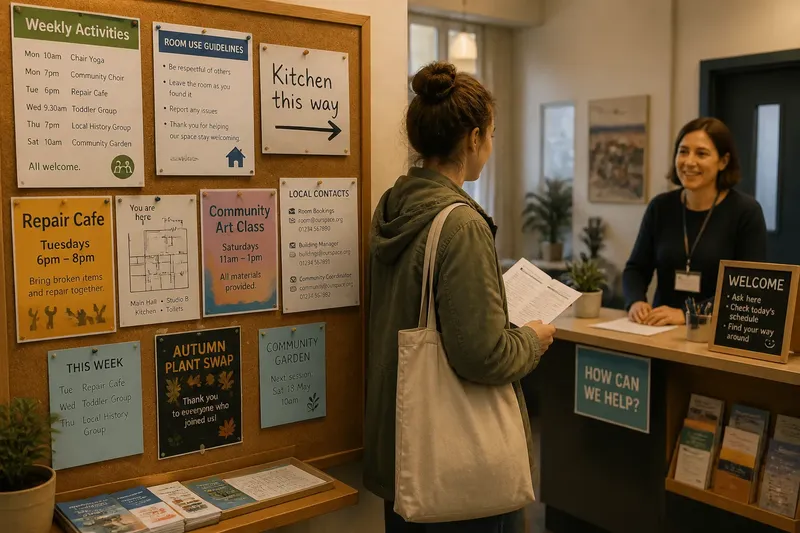
A visitor steps into a community hall carrying a folded form and pauses beside a board crowded with flyers. A handwritten arrow points toward a kitchen, but the room booking schedule is somewhere behind a poster for a past event. Shared-room information has often lived on a noticeboard; now, many facilities also use a welcome desk or simple orientation point. Each format makes different things easy to find.
A noticeboard gives information a place to stay
Fixed public notices suit information people may need to consult more than once: room-use expectations, a regular activity schedule, contact details, or a map of the building. A reader can stop, scan, and return later without needing to find a particular person.
The board’s strength is also its limitation. It does not distinguish between a detail needed today and a flyer left up after an event has passed. When current and outdated material look alike, visitors have to do the sorting themselves.
A useful board has a clear purpose. One section might hold recurring activities, another building information, and a small, separate area could be reserved for temporary notices. Plain labels help more than decorative headings; “This week” is easier to interpret than a clever phrase that only regulars understand.
- Give each notice a clear heading and a readable date or period of relevance.
- Keep information that answers the same kind of question together.
- Remove material that no longer helps someone decide where to go or whom to contact.
- Place essential instructions where a visitor can read them without moving other items.
The last point is not a call to make every board sparse. Some rooms rely on community notices as part of their character. The distinction is between useful variety and a pile that hides the information people came to find.
A welcome point helps with questions that change by the day
A desk, table, or clearly marked information spot can answer questions that a fixed board handles poorly: which group is meeting now, whether a room is available, or where to ask about a particular activity. Its value comes from exchange. A visitor can describe what they need, and the person there can point them toward the relevant information.
That directness depends on presence. An empty desk may look like the place to ask, but it cannot answer. If staffing is occasional, a small sign can say when someone is usually available and name another way to make contact. A notebook or loose stack of forms should not be treated as an obvious substitute for a person; visitors may not know what to do with it.
Keep the welcome point legible and calm. A name tag, a current room schedule, and a short list of common contacts may be enough. A desk covered with every flyer in the building merely recreates the crowded noticeboard at a different height.
Pair permanent guidance with live orientation
These formats work best when they divide the work. The board can hold information that stays useful over time; the welcome point can explain what is happening now and help someone choose the right next question. Neither needs to imitate the other.
Say a neighborhood room hosts a weekly repair gathering and also offers occasional classes. The board lists the regular gathering, the room’s general use notes, and a way to contact the organizers. On an evening with a class in progress, the person at the welcome table can direct a new arrival to the right group and clarify whether the repair gathering is meeting elsewhere. The visitor gets durable information from the board and a timely answer from the person present.
To keep the two sources from contradicting each other, decide which one owns each detail. The board might carry the standing schedule, while the welcome point handles changes for that day. If a regular time changes, update the posted schedule too; otherwise, a helpful spoken correction leaves the next visitor with the old answer.
Make the handoff between signs and people easy to follow
Information often fails at the point where one format sends a visitor to another. A notice that says “Ask inside” is of little use if the person inside is difficult to identify. A welcome sign that directs people to a board should name its location, not assume that every newcomer has already seen it.
Use familiar words for rooms and services. If staff call a space “the annex” but the door says “Studio B,” visitors may wonder whether those names refer to the same place. Choose one public name and use it on the board, room labels, and welcome materials. A small consistency like this reduces the need for explanation.
Accessibility matters here as well. Keep important text at a readable size and use strong contrast between letters and background. Do not make color the only way to distinguish categories. For visitors who cannot comfortably stand to read a board, a seated information point or a take-away sheet can offer another route to the same content.
How should a shared room choose its information format?
What belongs on a communal noticeboard?
Use it for information that remains useful beyond a single conversation, such as recurring activities, contact routes, and general room guidance. Give each item enough context to make sense without someone standing nearby to explain it.
When does a welcome desk help more than another sign?
A welcome point helps when visitors’ questions depend on the day, the activity, or their particular needs. It is most useful when someone can identify themselves as a person to ask and can direct visitors to a reliable next source.
How can a room keep notices current?
Assign responsibility for reviewing the board as part of the room’s ordinary upkeep, and remove items once their purpose has passed. A date or named contact on each notice makes it easier to judge whether the information still belongs there.
What if no one is available to greet visitors?
Make the self-guided information clear: identify the noticeboard, name the rooms in terms used on their doors, and provide a contact route for questions that cannot be answered on site. Avoid suggesting that a staffed welcome point is open when it is not.
Keep the welcome useful rather than elaborate
It is not worth building a complicated display system, adding a screen, or creating a separate brochure for every activity if a clear board and a dependable contact route already answer the common questions. More formats can mean more places to maintain and more chances for details to drift apart.
For a room considering a change, start by noticing where visitors pause and what they ask. If they repeatedly search for the current schedule, make that information easier to spot. If they can find the schedule but still do not know which group to approach, a person or a simple welcome point may help more than another poster.
Good shared-room information is not a choice between paper and conversation. It is a division of attention: notices preserve what people may need to check, while a welcome point helps them interpret what is happening now. When both are clear about their roles, a visitor can enter with a question and leave knowing where to look next.